

iRacing
How to get faster in iRacing
How do you get faster in iRacing? There isn’t one clear answer for that. Sorry. No single magic setting. Not one easy trick. There definitely isn’t a magic graphics setting that helps you find 0.5s. But there is a series of methods, or tips, you can follow if you’re relatively new to the service that will help. Naturally, the quicker you get, the more likely you are to face diminishing returns. If you reach the higher splits, competition is fierce. This isn’t a guide for professional esports-level drivers. If you’re just starting out, or stuck in the middle ground, then here are some tips, which, when combined, will hopefully result in lap time gains. Here are seven simple tricks to becoming quicker in iRacing.


How to Get Faster in iRacing
Practice
Captain Obvious here with this tip, but practice is key. You already knew that, right?
A key factor of being successful on iRacing, however, especially as you start your climb through your iRating journey, is not expecting to enter a race and secure a podium every time without preparation.
A Verstappen Racing professional sim racer may have natural talent, but a significant element behind their prowess is the many hours spent rehearsing.
On the flip side, we’re not suggesting you spend eight hours a day practising for a spec MX-5 race, either.
But it is recommended that you do a notable amount of practice before each race. Start with, for example, one hour of lapping in a test session (without other people), monitoring your split times, ahead of your next race with the same car and track combination.
If you’re still off the ideal lap times, don’t be afraid to seek advice. Be that YouTube video guides, asking for advice on the iRacing forum or using trophi.ai for real-time guidance and detailed post-practice session reports.
If you're weighing up whether coaching is worth the investment, we break it all down in iRacing Coaching: Is It Worth It and How to Choose the Right Option.
Custom Car Setups
Several of iRacing's more entry-level races use ‘fixed setups’. This means that car components, such as suspension parts, wing levels or the differential, cannot be changed, and everyone has identical settings.
This makes for a level playing field. But, in the real-world, fixed setups are rarely, if ever, a requirement. Often, even if all entries have the same car, key setup areas can be altered.
On iRacing, you may spot ‘open’ setup races, and it's here where practising your technique and the optimum route around the lap can only get you so far. Even if you drive perfectly, you could be leaving time on the table by running a default car setup.
In fact, recently, pro-level esports competitors such as Yuri Kasdorp and Kevin Ellis Jr have published videos bemoaning the base setups provided by iRacing.
Learning how to set up a car is a whole topic for another time. However, free and paid setups are available online.
The aforementioned sim racing competitors have created videos for specific setups, so too have many others. Then there’s the paid option, with services such as Grid-and-Go, Coach Dave Academy and GO Setups, offering setups from their full-time driving teams.
troph.ai subscription tiers above the premier level included Grid-and-Go setups, too.
If you would like to create your own, start slow, tweaking one element – let’s say damper clicks – at a time, understanding how each tweak can affect car behaviour.
Watch Others
We’ve mentioned watching content creators for advice, but don’t forget iRacing’s native replay function.
Sometimes overlooked, this is a powerful tool. If you’ve been beaten in a race, you can skip back to any point, switch from watching yourself to a rival, and follow from there. You may be able to pick up essential tricks, such as braking markers, turn-in points or racecraft tips.
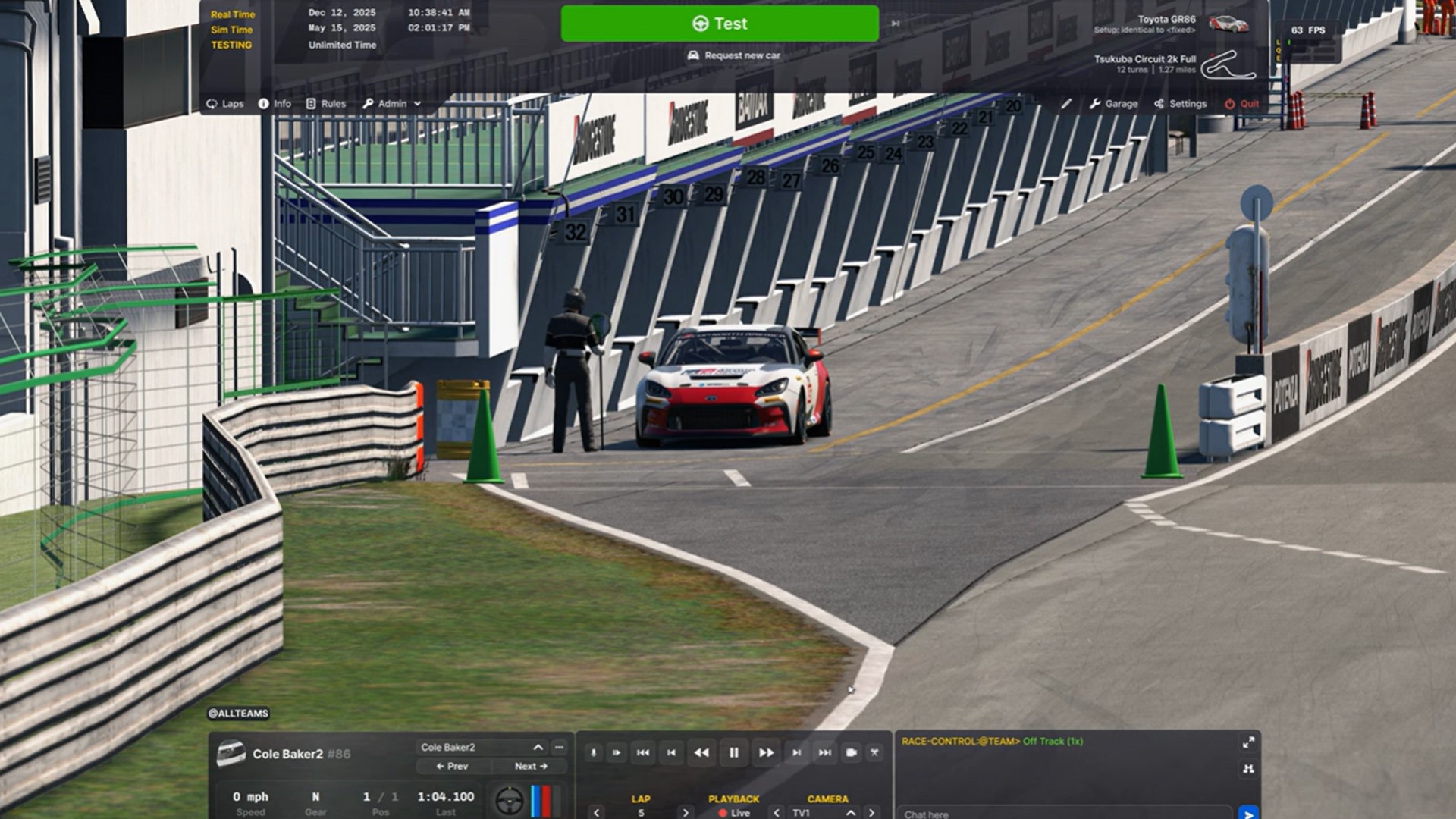
Using the interface is relatively straightforward; when in pitlane, but still in the session, you will see replay functions on the user interface. These include fast forward, rewind, and pause, for instance.
To the left of these options, you will see your own name. Click on it to open a drop-down menu of everyone who competed, and then select a rival to watch. Below the main replay playback options, you will see an area labelled ‘camera’. Click here to change viewing angle.
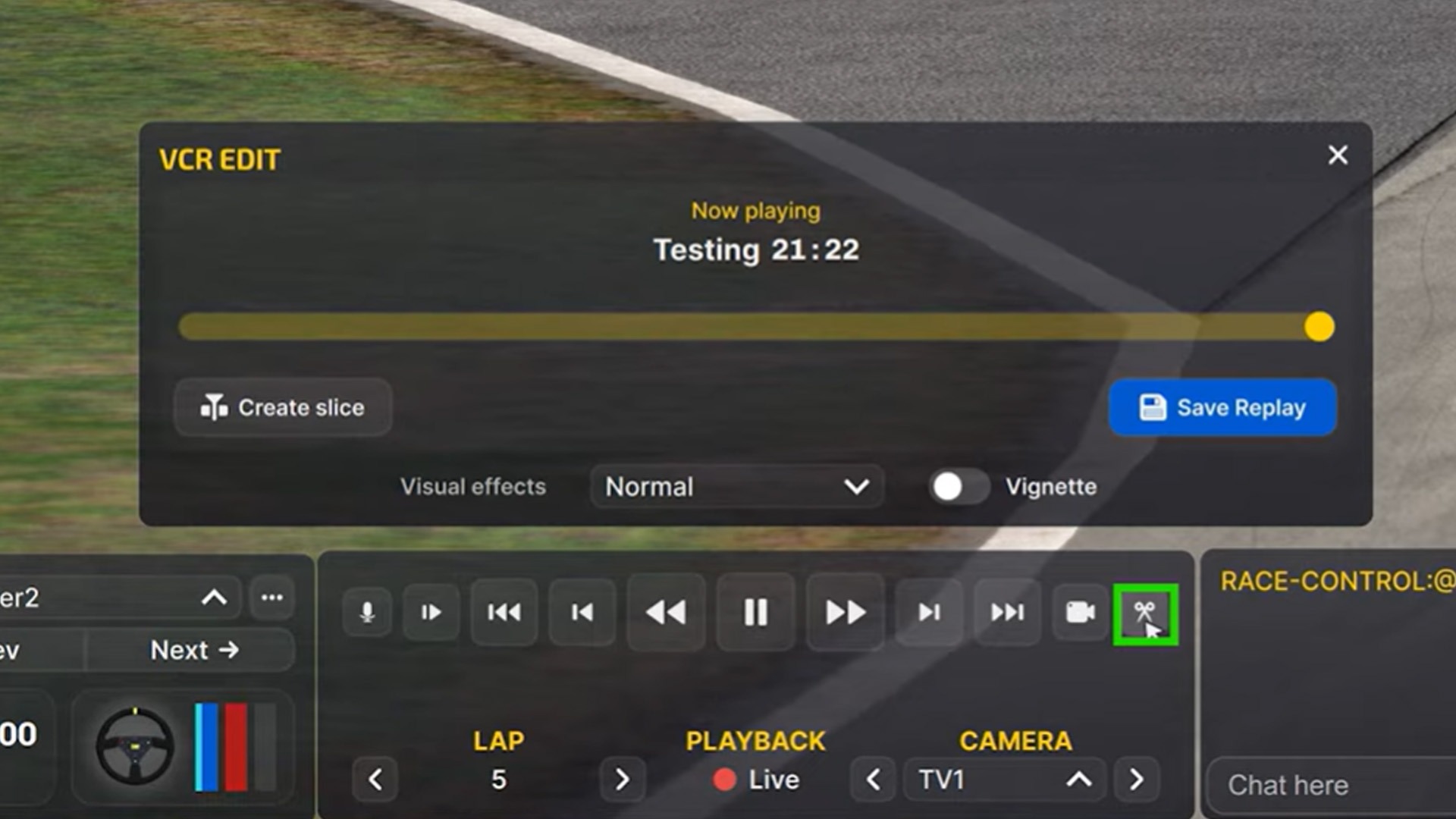
There’s also a save option to store it away for viewing later. Click on the scissor icon, and then ‘save replay’ will appear. You can either save the whole session or drag the yellow dot and select the ‘create slice’ option to trim unnecessary parts.
Active Reset
iRacing allows you to practice certain sectors, or corners, of a track, on repeat. For instance, you may be struggling with race starts, a pitlane entry or a certain curve, then Active Reset will allow you to focus on that specific area.
To do so, map controls to your wheel or nearby keyboard from within the settings menu. Then, when on track in a test session, you can tell iRacing where you’d like your Active Reset to begin. Then, simply hit the Active Reset ‘run’ button, and the game will fast-travel you back to your desired point.
This can be extremely helpful when trying to learn longer circuits, like the Nürburgring Nordschleife, for example. It prevents you from having to wait several minutes to retry sections or having to restart with cold tyres.
Dive Into Telemetry
Understanding telemetry, just like real-world motorsport professionals do, is perhaps more of an advanced-level suggestion. However, at least a basic understanding can help unlock lap time. We have a separate post to dive further into the topic.
Being able to compare your inputs, such as brake, steering and throttle, can provide clear areas for improvement. That could be braking earlier, turning smoother or applying throttle earlier, for instance.
There are several services that can be used with iRacing to compare your traces, such as Garage61.net. So too, trophi.ai, which, when in windowed mode, allows real-time telemetry on-screen, which can also be compared to a pro's lap.
Then you can see, either when on track or afterwards, whether their driving style differs from yours, and in turn, whether changes to your approach can result in a quicker time.
Seek Expert Advice
Even if you practice every point in this blog post, there’s always more to learn, especially considering iRacing’s diverse list of series.
Coaching could be the answer, and there are several options online, from one-on-one with a sim racing professional to trophi.ai’s Mansell AI.
trophi.ai’s virtual coach can provide audible pointers in real time around your lap, such as braking points and ideal gear selection. It can also assess your performance and provide specific areas to improve upon compared to a professional’s performance.
Taking things one step further, personal training sessions are available from a variety of providers or individual drivers. trophi.ai ‘s Professional subscription tier includes monthly 45-minute training sessions through Driver61, analysing your performance and offering advice. There are also weekly group classes included.
Patience and Perseverance
Ultimately, even if you become a telemetry wizard, use Mansell AI to ace your braking zones and master the active reset feature, being quicker in iRacing is not the work of a moment.
It will take patience and perseverance. However, if you see even the smallest improvement, say even a green sector time, use that as the motivation to dig deeper. As stated at the start of this guide, winning races is about more than one element. It takes a combination of factors, over time.
We haven’t even touched upon racecraft techniques for when you’re around other cars here, but improving your underlying pace is a significant factor that will help long-term results.
Harnessing the power of artificial intelligence, trophi.ai is a unique toolkit that provides real-time advice and in-depth analysis.
You can sign up for the free trial today.
Written by the team at trophi.ai and Traxion.gg


