


Rocket League
How To Speed Flip In Rocket League
If your speed flip feels like finger gymnastics, you’re probably doing too much. Most players overcomplicate it, and that turns kickoffs into chaos instead of an advantage.This guide strips the mechanic down to the three inputs that actually matter, covers the training pack codes you need, and answers the questions Diamond-and-below players ask most: controller vs keyboard timing, how long it takes to learn, and the two mistakes everyone makes on their first 50 reps.

TL;DR
A speed flip is a diagonal front-flip with a flip cancel. Three inputs: diagonal flip at 20–45°, pull straight back to cancel, small air roll to land flat. It saves ~0.1 seconds on kickoffs which is standard at Diamond and above. If you only use one training pack, use Musty’s (A503-264C-A7EB-D282).
Quick-start: (1) Diagonal flip → (2) Flip cancel → (3) Air roll correction. That’s the whole mechanic.
What Is a Speed Flip in Rocket League?
A speed flip is a kickoff-optimised diagonal front-flip with a flip-cancel. You flip forward and slightly to one side, then immediately pull back on the stick to cancel the animation, letting you boost continuously and land flat. Done cleanly, it saves roughly 0.1–0.15 seconds vs a standard front-flip kickoff, and unlike a straight flip leaves you still pointed at the ball instead of rolling sideways.
At Diamond and above, it’s effectively the default kickoff in ranked. Below that rank, inconsistency on speed flips is one of the most common reasons players “lose” kickoffs despite better mechanics elsewhere on the field.
The video below walks through a full kickoff rep in about 30 seconds. It’s useful if you learn better from seeing the timing than reading it.
Watch the full video here: https://youtu.be/ayoeRAVA2nw?si=ychKXmScuYQ3xuwh
How to Speed Flip: The 3 Inputs That Matter
Every speed flip variation — controller, keyboard, 1s, 2s, 3s — comes back to the same three inputs. Get these right and the rest is just reps.
We recommend breaking Speed flip down into three smaller steps to master:
Step 1: Diagonal Flip On a Clean Line (20–45°)
From your kickoff position, boost and jump, then flip forward with a slight diagonal, somewhere between 20 and 45 degrees off your line of travel. Too straight and you lose the speed bonus from the diagonal; too wide (past ~45°) and you start losing forward momentum and arriving sideways.
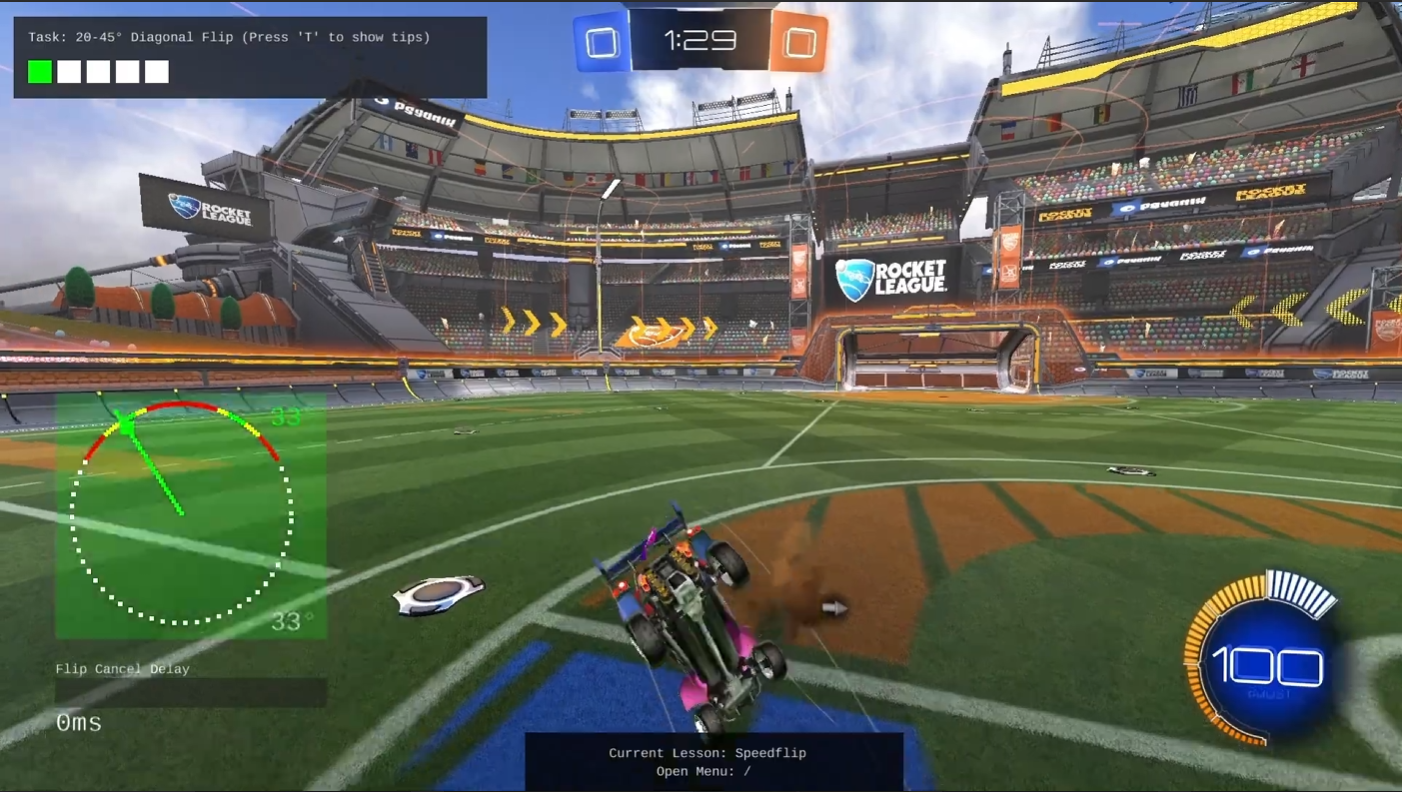
- Controller: Push the left stick slightly to one side before tapping the flip button. Consistent players use about 30° on the muscle-memory side.
- Keyboard: Press A or D for a brief frame before jump-cancel; less stick travel, so the diagonal is sharper by default.
Step 2: Flip Cancel Fast (Pull Straight Back)
The moment the flip animation triggers, pull straight back on the stick. This cancels the flip rotation so your car stays low and straight, and your boost keeps applying forward. Skip this and your nose points up, boost becomes less effective, and you arrive late.
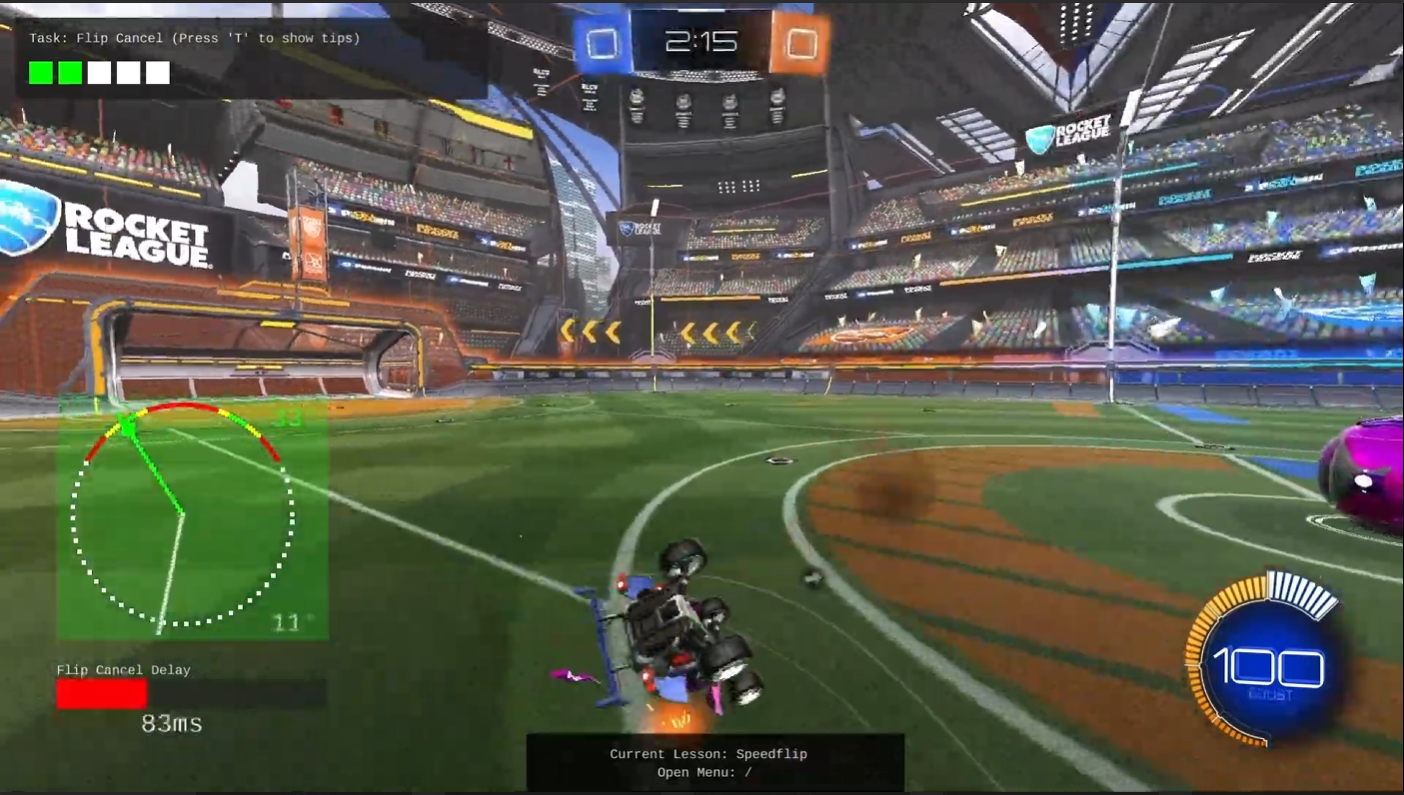
The timing window is tight. Think of it as one motion: forward-diagonal, then back, without a pause in between.
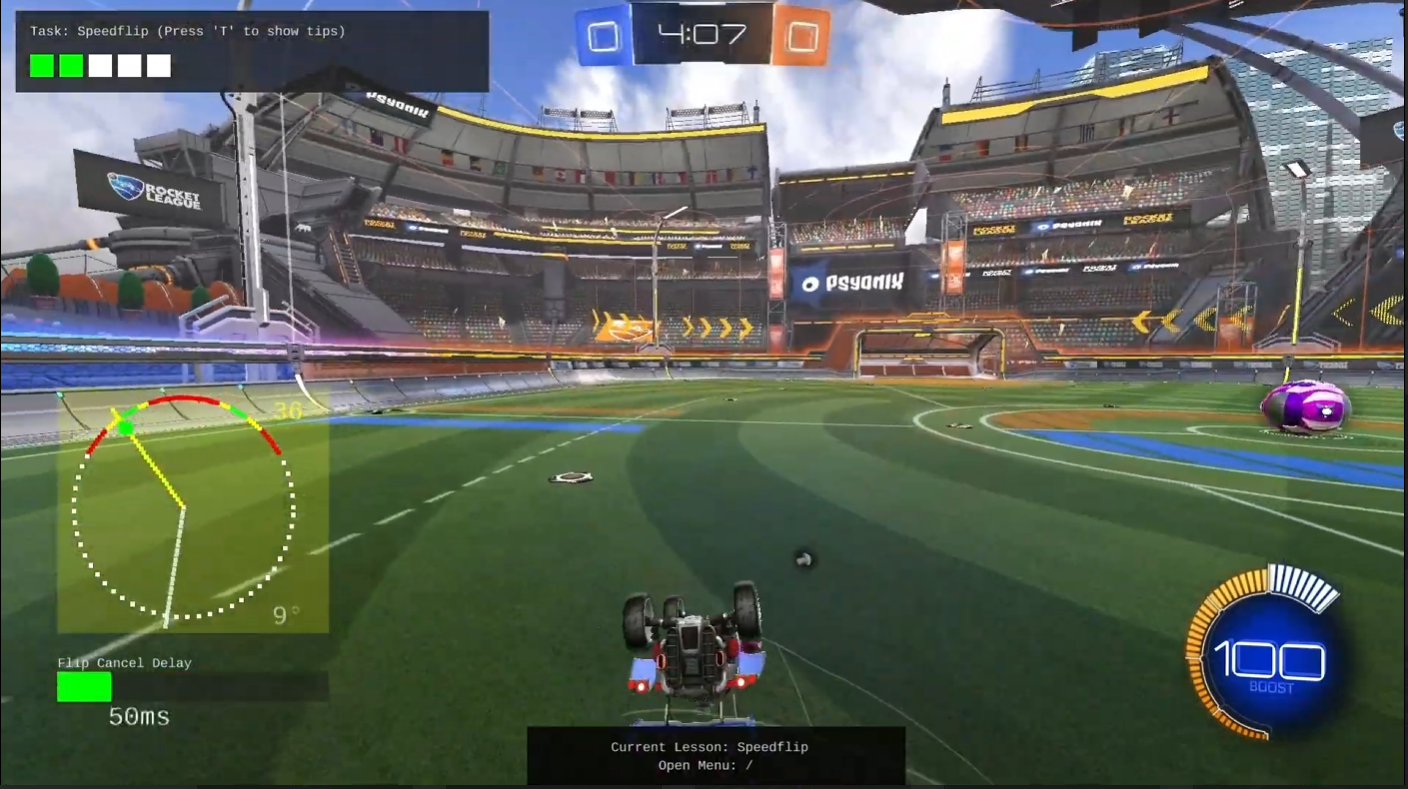
Step 3: Small Air Roll Correction To Land Flat
Because you flipped diagonally, you’ll be rotated slightly when you land. Apply just enough air roll in the opposite direction to put all four wheels on the ground aligned with the ball. Emphasis on “just enough”: the most common over-correction is holding the air roll too long and landing fully sideways.
Controller vs Keyboard Speed Flip (PS4, PS5, Xbox, PC)
The mechanic is identical across platforms; only the input feel changes. If you’re moving from one input method to another, expect about two hours of retraining before the speed flip returns to pre-switch consistency.
Controller (PS4, PS5, Xbox, PC with gamepad)
- Diagonal: left stick about 30° off-centre works for most players. Don’t slam it — a small tilt is enough.
- Flip cancel: pull the stick straight down in one fluid motion. If you’re arriving with your nose up, you’re pausing before pulling back.
- Air roll: most pros bind air roll left/right to bumpers rather than using free air roll — much easier to dose the correction.
Keyboard Speed Flip
- Diagonal: tap A or D for a single frame before pressing the flip key. The digital input means the diagonal is sharper by default, so lean closer to 20–25° rather than 45°.
- Flip cancel: press the backwards key (usually S) immediately after the flip. Keyboard cancels are arguably easier than controller — the timing window is more forgiving because inputs are binary.
- Common mistake: holding the diagonal key too long, which causes a 90° flip instead of a speed flip.
Having the correct camera and controller settings can make advanced mechanics like speed flips far more consistent.
Read our Best Rocket League Settings Guide to optimize your controls, deadzones, and camera setup.
Best Speed Flip Training Packs (Codes)
If you only use one pack, use Musty’s — it’s the reference artifact for this mechanic and the one every creator benchmarks against. Use the others to vary the kickoff line and stop muscle-memory from overfitting to a single angle.
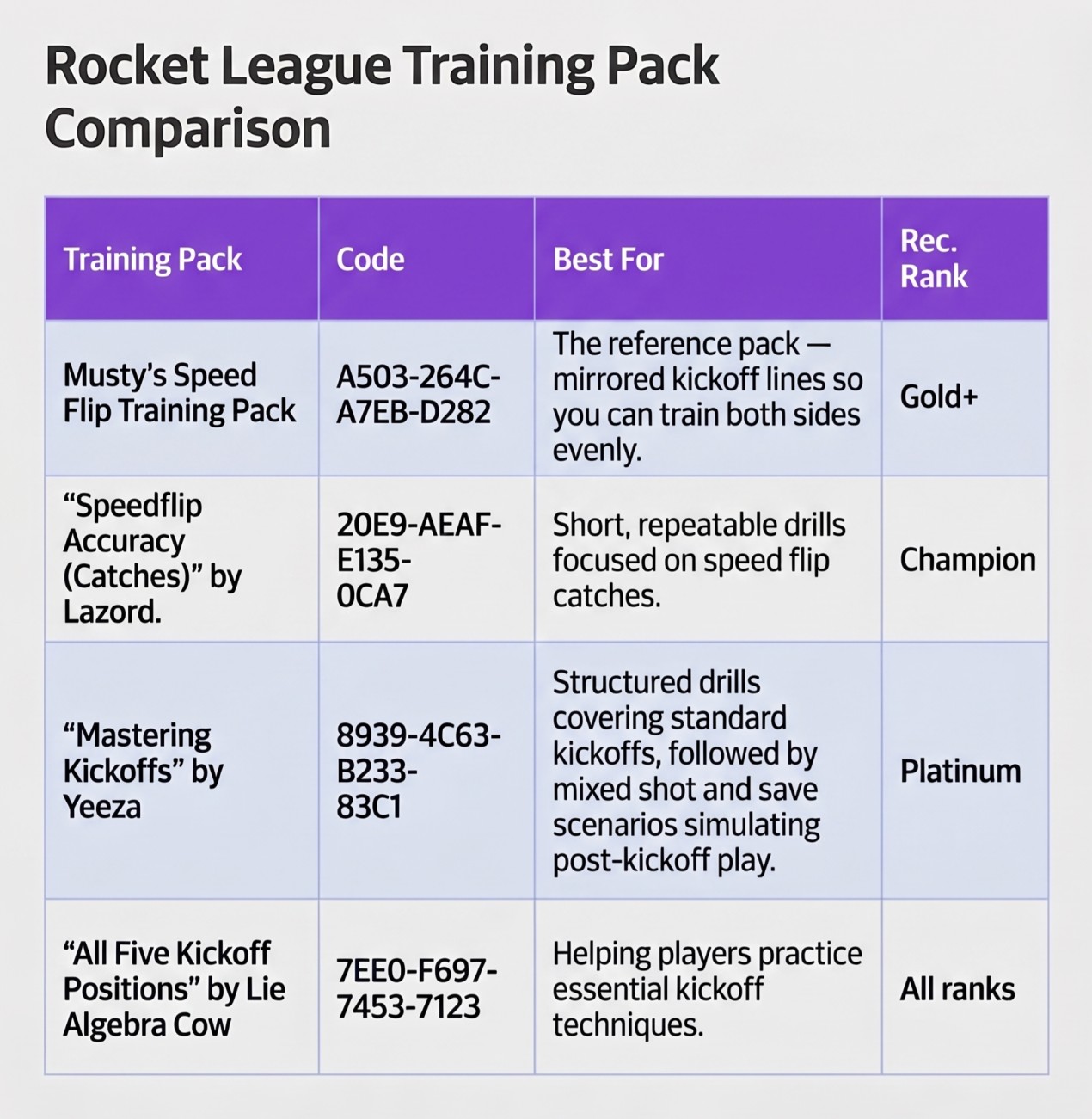
Musty’s Speed Flip Training Pack (code: A503-264C-A7EB-D282)
Musty’s pack is the one you’ve seen in every YouTube tutorial. It’s designed specifically around kickoff lines so you train the exact situation you’ll face in a ranked match, and it mirrors shots left/right so you train both sides evenly. Expected outcome: if you grind 20 minutes a day for a week, you’ll take the speed flip out of “thinking about it” and into muscle memory.
trophi.ai Speed Flip Lesson
trophi.ai includes a dedicated speed flip lesson built around the same three inputs in this guide: the diagonal flip, the flip cancel, and the air roll correction. Mansell, the AI coach, analyzes your kickoffs and gives you feedback on each component so you’re fixing the right thing instead of grinding reps blind. Open the app, go to the training section, and find the speed flip lesson.
BakkesMod: Speed Flip Trainer plugin
If you play on PC and run BakkesMod, install the Speed Flip Trainer plugin. It overlays real-time feedback on your flip angle, flip-cancel timing, and landing alignment — a step up from raw reps in a training pack because you see exactly which of the three inputs is drifting.
Common Speed Flip Mistakes (and Fixes)
- Front-flipping instead of diagonal. Fix: exaggerate the stick tilt for 10 reps, then dial back. If the flip animation shows no sideways rotation at all, you’re flipping straight.
- Holding air roll too long. Fix: tap, don’t hold. If you land completely sideways, the issue is duration, not direction.
- Landing sideways. Usually a combination of the previous two: too much diagonal on the flip and too much air roll. Reduce the flip angle first — it’s almost always the upstream problem.
- Nose up on arrival. You paused between the diagonal flip and the pull-back. Treat the two inputs as one motion.
- Speed flipping off the correct line. Line up your kickoff angle before boosting. If your car isn’t pointed at the ball before the flip, no speed flip will fix the approach.
When Should You Learn the Speed Flip?
Our recommendation, consistent with the Rocket League mechanics pillar, is to start drilling the speed flip in Diamond. Before Diamond, kickoff outcomes are noisy enough that inconsistent speed flips actively cost you games, whereas a clean straight-flip kickoff still gets you 50/50 results. Once opponents reliably win speed-flip kickoffs against you, the mechanic becomes the highest-leverage thing to add.
Players looking to understand what mechanics they should focus on at each skill level can check out our guide to Rocket League mechanics by rank.
Want Mansell to Dial in Your Speed Flip?
trophi.ai includes a dedicated speed flip lesson built around the same three inputs in this guide: the diagonal flip, the flip cancel, and the air roll correction.
Mansell, the AI coach, analyzes your kickoffs and gives you feedback on each step so you know exactly what to fix — not just that something’s wrong.
You’ll find the speed flip lesson by opening the trophi.ai app and going to the training section.
Ready to learn how to speed flip in the fastest way possible? Start coaching with Mansell ->
Written by the team at trophi.ai.
FAQs
FAQ
What is The Speed Flip Training Pack Code?
The most-used pack is Musty’s Speed Flip Training Pack, code A503-264C-A7EB-D282. Enter it under Training → Community in Rocket League. Re-verify the code in-game before relying on it — creators occasionally rotate codes.
How Long Does Speed Flipping Take to Learn?
Most Diamond-level players get a consistent speed flip after roughly 5–10 hours of focused practice in a training pack — about a week at 20 minutes per day. Getting it to work under pressure in ranked typically takes another 10–20 hours of live reps.
What Are The Steps To Speed Flip?
Three inputs: (1) diagonal flip at 20–45° off your line of travel, (2) flip cancel by pulling straight back immediately, (3) small air roll correction to land flat. Practice in Musty’s training pack until each step is unconscious.
Is the Speed Flip Different on PS4, PS5, and Xbox?
No. The mechanic is identical across PS4, PS5, Xbox, and PC with controller. Input latency is marginally lower on PS5 and Series X than on last-gen consoles, but not enough to change the technique or the timing window.
Can You Speed Flip on Keyboard?
Yes. Keyboard speed flips are arguably easier to cancel because the inputs are binary — there’s no stick travel. The main adjustment is using a sharper diagonal (closer to 20° than 45°) because A/D presses are all-or-nothing.
Is The Speed Flip Worth Learning For Beginners?
Not yet. Below Diamond, the speed flip’s 0.1-second advantage is outweighed by the cost of inconsistent kickoffs. Master a clean diagonal flip first, then layer in the flip cancel and air roll once you’re approaching Diamond.


